
Jira
Start with the work already assigned to you.
Choose assigned sprint issues, recognize bugs, stories and tasks by icon and your chosen colors, and upload reviewed worklogs without leaving Rotelle.


Rotelle
Native macOS · Version 1.5.2
A fast menu bar tracker that turns busy days into clean records, clear statistics, AI reports, and Jira worklogs — sent by you or on your schedule.
The actual app
See every task, every day total, and your weekly target in one focused native workspace.
New in 1.4 · Automatic worklogs
Choose a day, week, sprint or month. Rotelle rounds pending Jira time using your rules and sends it on schedule — without the end-of-day button ritual.
Off by default. Set it up once, with 23:00 as the starting time. If your Mac is asleep, Rotelle catches up when it runs again, keeps original work dates and waits for active timers to stop.
Three new Rotti medals celebrate 30, 300 and 1,000 automatically uploaded workdays.
Set up automatic worklogs →
New in 1.3 · Calendar
Connect macOS Calendar, choose your calendars, and turn a meeting into a tracked task with your confirmation. Review any past day and add missed meeting time without duplicating time already covered.
Automatic panels wait while you are on a call. Your statistics remember their view, and dedicated Rotti medals celebrate 1, 100 and 500 meetings.

New in 1.2 · Team-ready routines
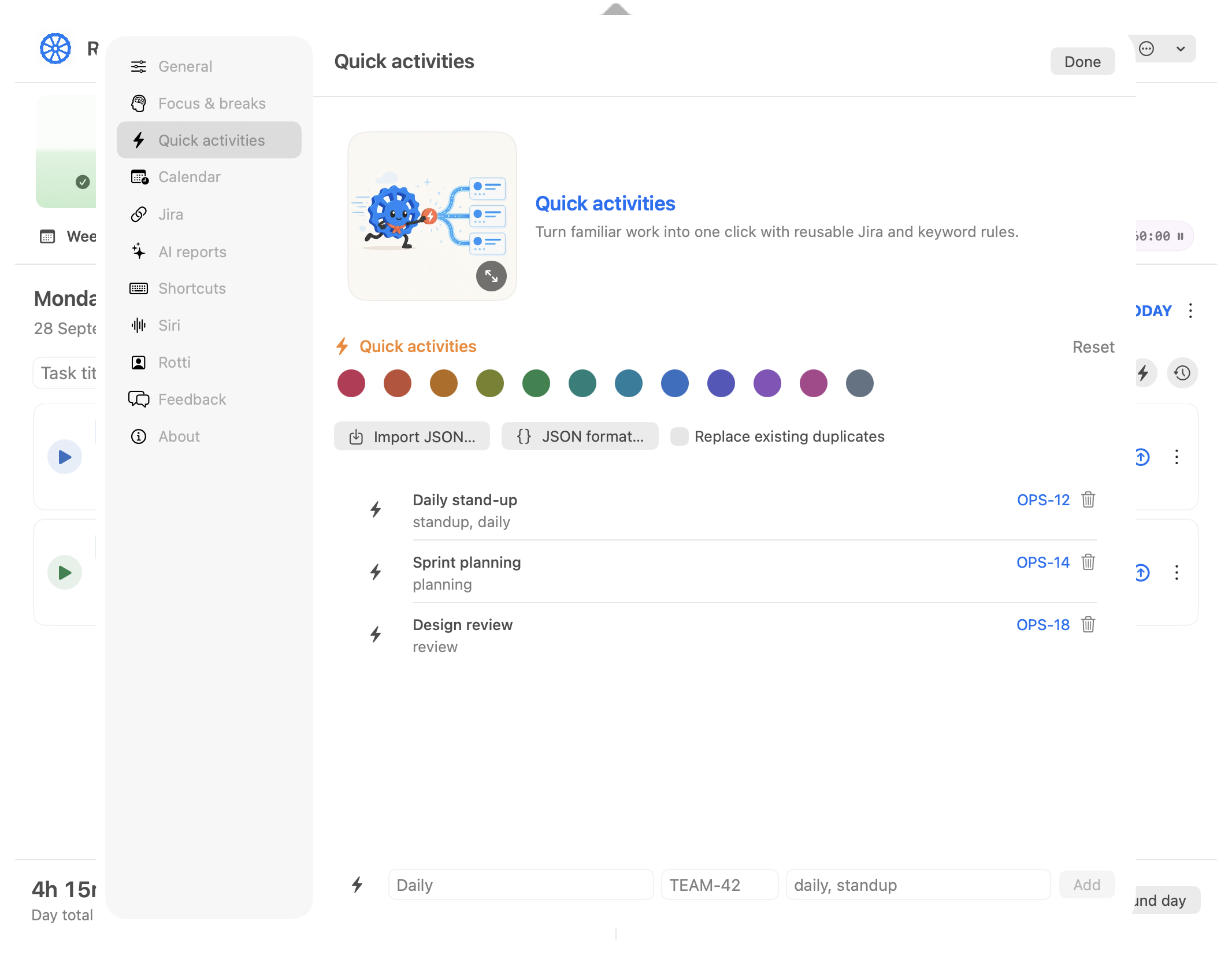
Quick activities now travel as versioned JSON. Copy the format inside Rotelle, import a teammate's file, and choose whether matching Jira keys should be skipped or replaced.
A visible delete action keeps the list tidy, while one smart task field understands plain titles, Jira keys, links, and mixed text.

New in 1.1
Rotti makes the next desk-height change unmistakable. Full-quality illustrations, clear arrows, and readable exercise guidance help you change position without interrupting your flow.
Movement milestones join the collection. Cumulative achievements can earn ×2, ×3 and more; your first-ever moments stay special.



New in 1.0 · Movement
Choose a reminder from 30 minutes to 3 hours. Rotelle counts actual tracked work, then shows one practical exercise without turning your day into a fitness program.

AI reports that remember
Turn a day, week or sprint into a useful summary, a team update or a starting point for your next demo.
Your provider. Your API key. Connect OpenAI, Claude, Google Gemini or a compatible API. Requests go directly from your Mac to your provider. API usage is billed to your account; chat subscriptions do not cover it.
Set up AI reports →Meet Rotti
Rotti eats time like pasta: the mess goes in, a trustworthy record comes out.
Jira
Choose assigned sprint issues, recognize bugs, stories and tasks by icon and your chosen colors, and upload reviewed worklogs without leaving Rotelle.

Quick activities
Reusable rules recognize common tasks, carry their own icons and colors, and travel between teammates as versioned JSON with safe duplicate controls.

Statistics
Explore a day, week, sprint, month or year with grouping that fits the period. Learn your natural focus rhythm and apply it to Pomodoro with one click.

Private iCloud sync
Optionally sync your Rotelle data through your private iCloud database, while Jira credentials stay in each Mac’s Keychain.

Achievements
Collect illustrated medals for focus, healthy breaks, AI reports, reviewing tickets and fixing defects. Some discoveries stay secret until earned.

Worklog reminders
Every two hours, Rotelle checks completed past days and nudges you when tracked Jira time still hasn’t been uploaded.

Focus & breaks
Pomodoro, eye-rest and movement reminders follow tracked work. Fifteen illustrated exercises include clear instructions, targets and official guidance.

Idle-time guard
After ten quiet minutes, choose whether idle time counted as work or should be excluded—without losing the session.
Made to fit your workflow
Set the important rules once, then keep every control, correction, reminder, and report close enough to use without breaking focus.
Search Jira by key or title inside meeting panels, choose pinned and recent tasks, and review conflicts before adding time.
Start a task today, open it in Jira, or copy its key and link directly from history.
See the next automatic Jira upload in the tracker, with sending, error and other-Mac status.
Record how you contributed to Jira work, keep each role’s time separate, and choose exactly what belongs in a demo report.
Reopen successful reports with their prompt and source snapshot without making another paid request.
Set a recurring one-to-four-week calendar or select a dated sprint loaded from your assigned Jira issues.
Start an existing task, stop timers, read their status, take a Pomodoro break or open a Rotelle screen through Shortcuts.
Start or pause the current task without opening the full tracker window.
Choose how much of the working week to keep visible and switch layouts whenever you need more context.
Set realistic targets and see your progress and overtime directly beside the work they came from.
Move work to another visible day, or hold Option to copy it without carrying old sessions or upload state.
Correct a task’s total in place without interrupting the rest of your day.
Move a precise portion of a stopped task to another date while preserving combined displayed and raw session totals.
Keep the original start and stop segments even after manual edits or rounding change the displayed total.
Find work by Jira key, title, or note, then open any day on which that task was tracked.
Round individual tasks or a finished day to the interval that matches your reporting rules.
When a running timer is left unattended, decide whether the quiet interval counted as work.
Rotelle learns the median length of your recent focus sessions and can use that exact duration for Pomodoro.
Healthy-break schedules advance with real tracked work, so focus, eye-rest and movement prompts arrive at a useful moment.
Turn recurring work into recognizable one-click activities, then share them as JSON with safe skip-or-replace duplicate handling.
Start from the Jira issues you actually use instead of searching the whole workspace every time.
See each issue’s current Jira status beside its key before choosing what to work on.
Keep issue titles, descriptions, projects, epics, and links close to the timer that belongs to them.
Upload manually by default, or explicitly enable scheduled rounding and upload by day, week, sprint or month.
A rejected worklog keeps its error and retry control visible instead of quietly disappearing.
Moved, copied, and older tasks are logged to the Rotelle day you selected, not an accidental session date.
Compare where time went across individual tasks, Jira tickets, projects, days, weeks, and months.
See when you tend to work by clock hour and by day of the week using your actual timer sessions.
Track completed focus cycles and the distance accumulated through uninterrupted eye-rest breaks.
Unlock illustrated Rotti medals for focus, consistency, healthy breaks, Jira habits, and curious detours.
Browse your complete local work history without crowding the focused daily tracker.
Audit a day or week, compare a custom date range, and export structured totals for further analysis.
Inspect and correct individual start and stop segments instead of replacing the whole task total.
Deleted tasks remain recoverable for 30 days before Rotelle removes them permanently.
Export or restore time, settings, history, and achievements in one portable file without Keychain secrets.
Keep Rotelle data aligned between your Macs through your private iCloud database while remaining useful offline.
Set local shortcuts for frequent Rotelle actions without intercepting keys in other apps.
Nudge the current task up or down by five minutes from the keyboard while preserving its raw sessions.
Type the numeric part of a Jira key to highlight matching tasks without opening a separate search panel.
Change what the menu-bar widget shows and what its ticket name opens without visiting Settings.
Timer changes happen only from the clear play control, while empty widget space opens the full panel.
Send a comment or idea directly from Rotelle without opening an email app or attaching your work data.
Rotelle protects totals around system inactivity and reminds you when completed Jira time was left behind.
Begin each weekday with a rotating Rotti scene and a practical tip chosen for how you use the app.
Close the day with goals, overtime, breaks, tasks, and eligible Jira worklogs gathered in one review.
Remove an account and unused credentials without deleting existing time history or uploaded worklogs.
Jira passwords and OAuth tokens stay in macOS Keychain and never enter backups or iCloud sync.
Rotelle vs Harvest / Tempo / Toggl
Rotelle is deliberately narrower: it is for an individual Mac user who tracks Jira work and wants the timer close, the raw history local, and worklog upload under their control.
Best for · Solo Jira work on Apple Silicon
A native menu bar workflow for tracking, reviewing, and sending clean worklogs to Jira without living in another web app.
Best for · Client services and invoicing
A mature choice for teams that connect tracked time to clients, budgets, expenses, approvals, and invoices.
Best for · Jira-native team governance
Built for organizations that need time collection, approvals, capacity, and financial reporting inside Jira.
Best for · Flexible cross-platform tracking
A broad time-tracking platform for people and teams working across devices, clients, projects, and many tools.
Choose Rotelle when the problem is simple:
“I need to track Jira work from my Mac, review the day, and upload trustworthy worklogs — without turning time tracking into another job.”
Product names belong to their respective owners. Comparison reflects each product’s stated focus as of August 2026.

Local by nature
Rotelle keeps time data locally by default, can sync it through your private iCloud database when you choose, and stores Jira credentials and AI keys in Keychain. AI reports are optional: only the selected report records are sent to your chosen provider when you request one.
Designed for Apple Silicon Macs.
For the rest of your workday
Rotelle looks after the time. These companions help with the screen time around it and the useful things you copy along the way.

Eye care that travels with you
Rotelle can schedule eye-rest reminders on your Mac. Occhi di lupo brings guided breaks, progress, and private vision screening to iPhone.
A second productivity tool for your Mac
Keep clipboard history, reusable snippets, Jira links, and common paste actions ready while Rotelle keeps the workday accounted for.